
Your license of Avizo or Amira has been designed to run on a specific hardware configuration and be used by a specified number of users. You may have either node-locked licenses, which are bound to a specific system, or floating licenses, which are bound to a license server from which users can check out licenses.
Each type of license requires a specific license key (or “password”) to unlock the product. In order to generate this password, we need the computer ID or possibly the host ID of your computer for node-locked licenses, or the host ID and host name of your license server for floating licenses.
1 Getting your Computer ID or host ID – node-locked licenses
Node-locked licenses are licenses that unlock the product on a specific computer. The computer is specified by its computer ID or host ID. If you will be using a password file, you will need to provide the computer ID. If you will be using activation codes, you will need to provide the host ID.
1.1 Computer ID – for use with password.dat files
When you launch your Amira or Avizo product, if no valid license is found, the License Manager window will be displayed. If necessary, select Help->License Manager to display the dialog.
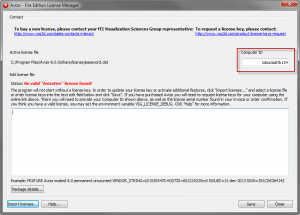
The Computer ID is displayed in the Computer ID field, as highlighted above. (The field name may vary depending on the version of the product.)
IMPORTANT: Please disable all temporary network connections (WLAN card, docking station, etc.) before running Amira or Avizo to obtain the computer ID. This ensures that the computer ID is based on a permanent network adapter. You can re-enable the temporary network connections afterwards.
1.2 Host ID – for use with activation codes
1. Open a command console on Windows, a command shell on a Linux system, or a terminal window on a Mac.
2. Use the cd command to go to the share/license/FLEXnet subdirectory of your Amira or Avizo installation.
3. To get the host ID, execute the command lmhostid
If more than one host ID is displayed, please send us only one.
2 Get your host ID and host name – floating licenses
Floating licenses are installed on a license server, and can be checked out by client systems that connect to the server over a network. The Amira and Avizo floating licensing mechanism uses FLEXnet technology from Flexera. To generate your floating licenses, we will need the host ID and host name of your license server.
1. Open a command console on Windows, a command shell on a Linux system, or a terminal window on a Mac.
2. Use the cd command to go to the share/license/FLEXnet subdirectory of your server tools installation. If you have a relatively recent version of the FLEXnet tools, the tools are in a directory named FlexNetLicenseServerTools.
3. To get the host ID, execute the command lmhostid
If more than one host ID is displayed, please send us only one.
4. To get the host name, execute the command lmhostid -hostname.
For more information on the FLEXnet server installation, please refer to Installing, Configuring, And Administrating A FlexNet License Server documentation.